Auto Power Dialer (Tablet)
Pay just $3.99 one time.
No monthly fee.**Note** -- This is only for tablets.
For your Android phones, please download the regular version(s).-- You must have VoIP applications like GrooVe IP, CSipSimple, SipDroid, Google Voice, WiCall etc installed so outbound calls can be made from your tablet.
* Generate more qualified leads.
* Boost productivity and talk time.
* Increase Completion Rate.
* Make you more efficient (by reducing AHT).
It is very intuitive and easy to use.
No expensive hardware is required.
No technical knowledge is required.
It is like a outbound call center (contact center) in your pocket.It is an ideal autodialer tool for
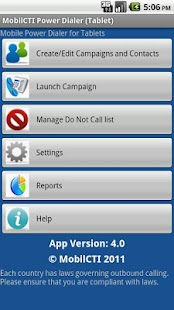
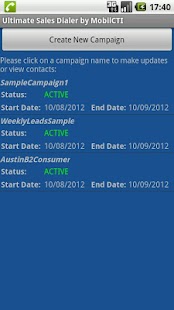
* Sales and Marketing Professionals* Small Business owners (real estate, services, insurance agents, Home Business, etc)* Outbound Sales (Telemarketing)* Business lead generation for B2B and B2C.It can be used for fund raising, political and pro active customer Service campaigns.The automated MobilCTI Power Dialer offers following main features that will increase productivity.1) Ability to create multiple Campaigns fast and easy.
2) Ability to import Contact Lists from either Google Contact Groups (Cloud) or .CSV files.3) Ability to schedule a follow up call on specific date and time.4) Place calls to contacts in either Preview dialing or power dialing mode.
5) Built in Do Not call capability to prevent calls to phone number in application’s do not call list.
6) Ability to configure maximum attempts for each contact.
7) Caller can reschedule contact by one click to be dialed in 15 minutes or in 1 hour or in 1 day.
7) Caller can capture call outcome and add notes at the end of each call.
8) Built in report that shows progress for each campaign.
9) Ability to export contact results to CSV file.• Preview dialCaller can view contact information and get himself or herself familiar with the contact info.
Then caller pushes a button and the call is placed from his Android phone.
• Power dialThe dialing starts automatically and calls will be placed one after another.
The application settings determine the pause between displaying the contact info and dialing.
This setting can be configured by the caller.Please try the MobilCTI Power Dialer Lite (free) version to try creating campaigns, report and do not call list etc.Tested with VoIP (SIP) dialers such as LinPhone and SipDroid.
Also this application can be used with GrooVe IP, Gizmo5, Fring, Google Voice Dialer, Sipdroid, 8x8, so users call dial outbound calls via SIP.Volunteers needed to test Power Dialer with Skype, Viber, Tango, Vyke, Nimbuzz, Lebara, Truphone, Fring, MO-Call, FriendCaller, Rebtel, Voxofon, Raza, Vonage etc.
Please email your findings to us.
MobilCTI Power Dialer is very easy to use and will increase productivity of Individuals and Small Businesses (SMB) for fraction of the cost.
It is a ideal solution for individuals and professionals to use in the following scenarios: telesales, cold calling lists(Sales list), Warm Calling, occasional client call, Customer Relationship Management (CRM), Help Desk, Service Desk Management, outbound telemarketing, Network marketing, call dispatch and lead generation (prospecting).
Also it can be used by Insurance agents,Real Estate agents, Collection Agency, Dentist and Doctor offices to reach their client.
It is a powerful positive force to grow your company.
For sample telemarketing scripts/ called calling scripts, please visit our website.
About Auto Power Dialer (Tablet)
- Package name (App ID)
- com.mobilepowerdialer.tablet
- Available on
- Google Play
- Price
- Free
- Version
- v1.40
Looking for the Auto Power Dialer (Tablet) APK?
The safest way to get Auto Power Dialer (Tablet) (com.mobilepowerdialer.tablet) on your Android device is to install it directly from Google Play — you'll always get the latest official version, automatic updates, and no risk of modified or infected APK files from third-party sites.
Social Features
Connect and share with friends and the community.
Gaming Features
Enjoy immersive gaming experience with various game modes.
Weather Features
Get accurate weather forecasts and real-time updates.
See Auto Power Dialer (Tablet) in Action

Frequently Asked Questions
Is Auto Power Dialer (Tablet) free?
Yes, Auto Power Dialer (Tablet) is free to download and install on Android through Google Play.
How do I install Auto Power Dialer (Tablet) on Android?
Open Google Play on your Android phone or tablet, search for Auto Power Dialer (Tablet) or tap the Google Play button on this page, then tap Install. The app downloads and installs automatically.
What is com.mobilepowerdialer.tablet?
com.mobilepowerdialer.tablet is the App ID (package name) of Auto Power Dialer (Tablet) on Google Play. Every Android app has a unique package name, and it is the safest way to verify you are installing the official app.
Is Auto Power Dialer (Tablet) safe to download?
Installing Auto Power Dialer (Tablet) from Google Play is the safest option: you get the official version, verified by Google Play Protect, with automatic updates. Avoid APK files from unofficial third-party sites.
Get Auto Power Dialer (Tablet) Today
Auto Power Dialer (Tablet) for Android — free download on Google Play.
Compatible with Android phones and tablets — available on Google Play.
Ask AI about this app
Get instant answers about features, tips and more from popular AI assistants.